
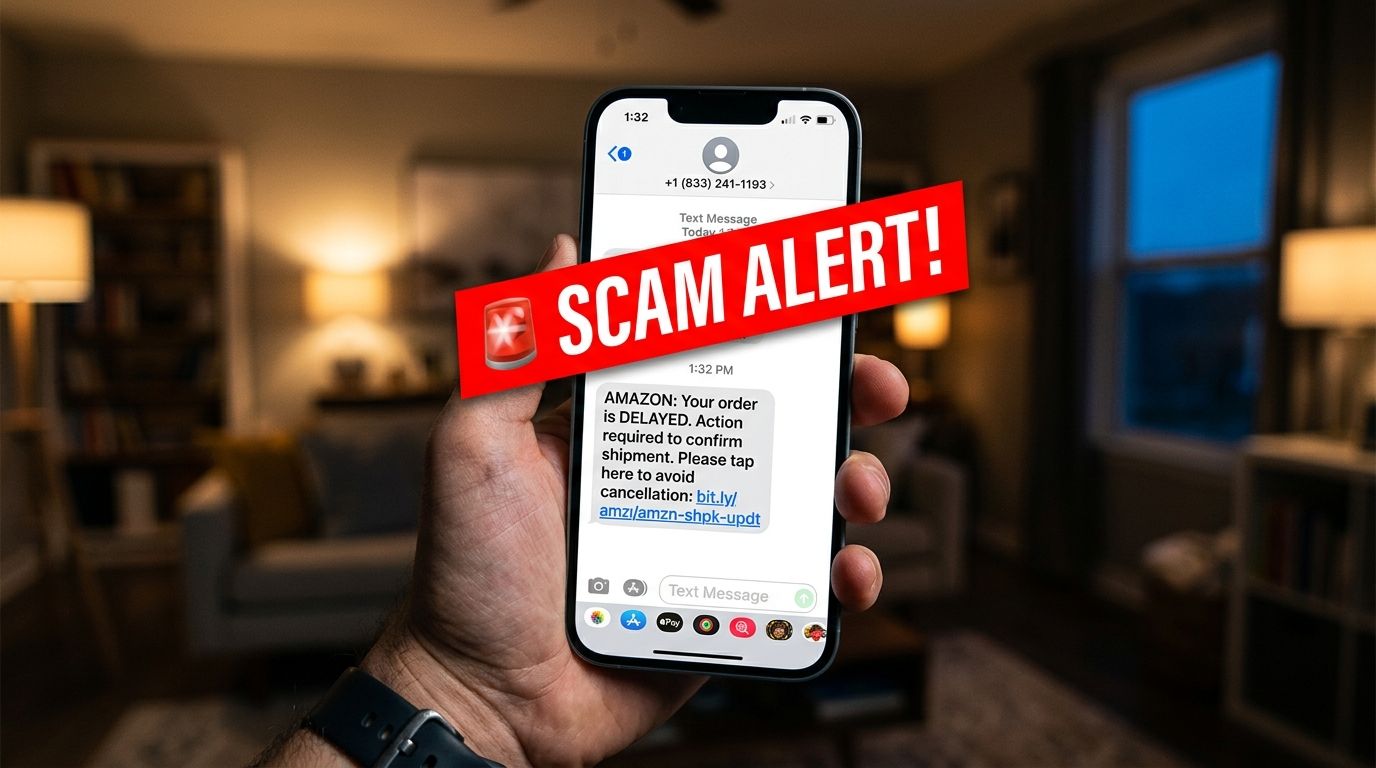
Got a Fake Amazon Text? Here's How to Tell in 30 Seconds
Spotting an amazon scam text message takes less than thirty seconds when you know which signs to examine. Millions of shoppers receive fake delivery alerts and order confirmations on their mobile phones every single day. These deceptive text alerts trick honest people into sharing personal account passwords or credit card numbers. Learning how to check these alerts protects your hard-earned money and keeps your identity safe.
Digital thieves know that most households order online products on a regular basis. They hope a sudden text message about a missing package will trigger instant panic. You can protect your personal accounts by using four simple verification steps before tapping any web link. This practical guide shows you how to identify a fake text and handle suspicious messages safely.
What a Fake Amazon Text Usually Says
Scammers use a few common story setups to trick you into opening malicious web links. The most common setup claims your package could not be delivered due to an incomplete home address. A mock message might state that your shipment is on hold and ask you to update details immediately. Another setup alerts you to a fake expensive purchase that you never actually authorized. These fraudulent alerts promise a quick refund or ask you to confirm your card details to cancel the order.
Criminals also send fake messages claiming your online shopping account has been locked due to billing issues. They create these fake scenarios because they know unexpected financial alerts cause immediate worry. When you feel anxious about a locked account or a lost package, you are more likely to tap links. Understanding these common setups helps you pause and evaluate the message before reacting.
How to Spot an Amazon Scam Text Message by Checking the Sender
The first thing to examine on a suspicious text message is the sender's phone number. Official notifications from major online retailers arrive through verified short codes or established customer service numbers. Short codes are brief five-digit or six-digit numbers used by large companies for automated text messaging. If an incoming text comes from a standard ten-digit personal phone number, treat it with extreme suspicion.
Checking sender details takes only a few seconds on both iPhone and Android mobile devices. On an iPhone, tap the sender icon at the top of your message screen to display the phone number. On an Android phone, tap the three dots in the top corner and view the details menu. If the incoming message displays a full personal phone number from an unknown area code, do not reply. Real companies do not send automated account updates from private personal cell phones.
Why You Should Verify Orders Directly in the App Instead of Tapping Links
The safest rule for managing online accounts is to never tap links inside unverified text messages. Scammers build fake web pages that look identical to official login screens to steal your credentials. When you enter your password on a fake page, criminals capture your details instantly. Instead of tapping the web link, open your official mobile app independently on your device.
You can also open a web browser and type the official website address directly into the address bar. Log into your account securely and check your official message center or your recent order history. If a real delivery issue exists, the official dashboard will display the exact same alert. If your account dashboard looks normal and shows no alerts, the text message was completely fake. Checking your account directly removes all financial risk and keeps your login information private.
How Urgency Tactics Reveal an Amazon Smishing Scam
Artificial pressure is one of the most reliable warning signs of an Amazon smishing scam. Smishing is simply the technical term for phishing attacks executed through text messages instead of emails. Fraudulent text messages insist that you must act within twenty-four hours to prevent account closure. They use threatening language about canceled orders or extra fees to force rapid decisions.
Legitimate retail companies do not threaten immediate account deletion over a routine delivery update. Fake text alerts also rely on generic greetings or omit your name entirely because scammers send mass messages. Official alerts usually include your specific item details or reference your actual account profile name. When a message lacks specific order details and demands instant action, you are looking at a fraud scheme.
What Sensitive Information Real Companies Never Request via Text
Understanding what legitimate companies will never ask for protects your private personal details. No real online merchant will ever ask you to text back your account password or credit card number. They will never text you asking for your Social Security number or full bank routing details. Official customer service channels handle sensitive billing updates inside secure account portals, never through text exchanges.
If a text message directs you to a form asking for financial details, close the page immediately. Criminals use these fake web forms to steal your banking information and commit identity theft. Real businesses protect customer privacy and will never demand sensitive identity verification over unencrypted text channels. Recognizing these strict communication boundaries keeps your identity secure across every digital platform.
What to Do If You Already Clicked or Replied
If you tapped a link or replied to a fake text, take immediate action to secure your account. Close the web browser window right away without entering any passwords or personal details into the form. If you already submitted your password, open your official shopping app and change your password immediately. Create a strong password that you do not use on any other online accounts or banking websites.
Next, review your recent order history and saved payment methods for any unauthorized purchases. If you entered credit card details, contact your bank right away to report the suspicious activity. Ask your financial institution to cancel the compromised card and issue a new replacement card. Contact official customer support directly through the app to report the fraudulent message and secure your profile.
Protect Your Shopping Account from Fake Alerts
Handling suspicious text messages comes down to staying calm and verifying details through official channels. Scammers depend on fear and sudden panic to trick you into making hasty decisions with your money. When you know how to check senders and verify orders directly, you keep your digital life safe. Never feel pressured to tap links or share private information over an unannounced text message.
You do not have to guess whether an incoming text link or website domain is safe. You can test suspicious links using our free safety tool before tapping them on your mobile phone. Visit the VastOutlet Threat Rating Engine at https://www.vastoutlet.com/rating-engine to scan unverified web addresses today.
Worried this happened to you?
Our Threat Rating Engine can analyze suspicious URLs, email addresses, or cryptocurrency wallets associated with potential scams.
Scan suspicious linkarrow_forwardProtecting Your Digital footprint
Once you have identified these threats, taking immediate action is essential. Do not delay banking checks or changing passwords. By locking down your account security policies and setting up credit monitoring blocks, you can completely isolate yourself from modern credential-harvesting networks.